我最先接触到状态机是在利用 cocos 编写游戏的时候,游戏的变量特别多,各个组件之间也有通讯的需求,状态机这种概念刚好解决了变量之间传递的繁琐。而且状态机不同于全局变量,一般来说状态机都是可以带事务触发的,所以它更适合做一些大型的,或团队协作的项目。下面我们就来说说 Vue 和 React 这两种当下最热门的前端框架所对应使用的状态管理器(Vuex 和 Redux)。
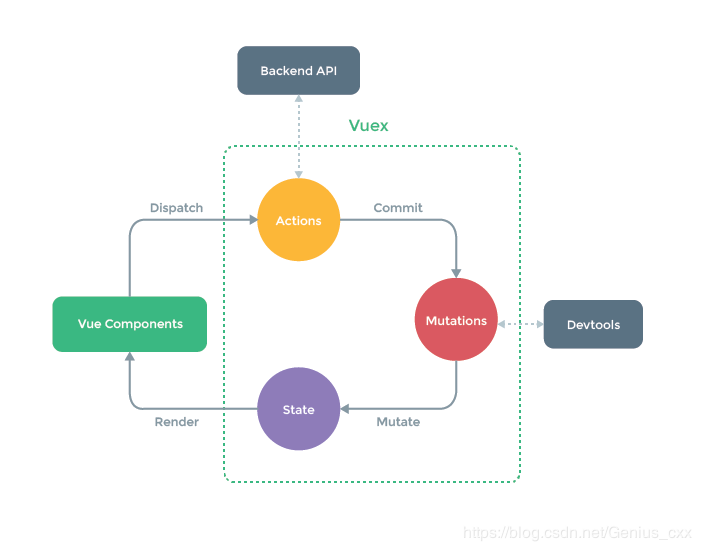
vue 状态管理器 vuex
在 vue 中使用状态机,需要先安装
1
npm install vuex --save
/store/index.js1
2
3
4
5
6
7import Vue from 'vue'
import Vuex from 'vuex'
Vue.use(Vuex)
const store = new Vuex.Store({
...
})
export default store
/main.js1
2
3
4
5
6import store from './store'
new Vue({
store,
render: h => h(App),
}).$mount('#app')
至此,我们就可以开始编写 vuex 的业务代码了。
State
vuex 中保存的“数据状态”,可以在页面通过 this.$store.state 来获取已经定义好的状态。
/store/index.js1
2
3
4
5
6
7
8
9import Vue from 'vue'
import Vuex from 'vuex'
Vue.use(Vuex)
const store = new Vuex.Store({
state: {
count: 1
}
})
export default store
/src/App.vue1
2
3
4
5<template>
<div>
{{ this.$store.state.count }}
</div>
</template>
Getters
相当于 vue 中的 computed 计算属性,getter 的返回值会根据它的依赖被缓存起来,且只有当它的依赖值发生了改变才会被重新计算,这里我们可以通过定义 vuex 的 Getter 来获取,Getters 可以用于监听、state 中的值的变化,返回计算后的结果
/store/index.js1
2
3
4
5
6
7
8
9
10
11
12
13import Vue from 'vue'
import Vuex from 'vuex'
Vue.use(Vuex)
const store = new Vuex.Store({
state:{
count:1,
},
getters:{
getStateCount: state => state.count + 1
}
})
export default store
/src/App.vue1
2
3
4
5
6<template>
<div>
{{ this.$store.state.count }}
{{ this.$store.getters.getStateCount }}
</div>
</template>
Mutations
数据我们在页面是获取到了,但是如果我们需要修改 count 值怎么办?如果需要修改 store 中的值唯一的方法就是提交mutation 来修改,我们现在 App.vue 文件中添加两个按钮,一个加1,一个减1;这里我们点击按钮调用 addFun(执行加的方法)和 reductionFun(执行减法的方法),然后在里面直接提交 mutations 中的方法修改值
/store/index.js1
2
3
4
5
6
7
8
9
10
11
12
13
14
15
16
17
18
19
20
21import Vue from 'vue'
import Vuex from 'vuex'
Vue.use(Vuex)
const store = new Vuex.Store({
state: {
count:1,
},
getters: {
getStateCount: state => state.count + 1
},
mutations: {
add (state) {
state.count = state.count + 1
},
reduction (state) {
state.count = state.count - 1
}
}
})
export default store
/src/App.vue1
2
3
4
5
6
7
8
9
10
11
12
13
14
15
16
17
18
19
20
21
22
23<template>
<div>
<p>{{ this.$store.state.count }}</p>
<p>{{ this.$store.getters.getStateCount }}</p>
<p>count 的值:{{ this.$store.state.count }}</p>
<button @click="addFun">+</button>
<button @click="reductionFun">-</button>
</div>
</template>
<script>
export default {
name : 'app',
methods: {
addFun(){
this.$store.commit('add')
},
reductionFun(){
this.$store.commit('reduction')
}
}
}
</script>
Actions
我们看到,当点击三次后值从 2 变成了-1;页面上的值是改变了;我们达到了修改 store 中状态值的目的,但是,官方并不提倡我们这样直接去修改 store 里面的值,而是让我们去提交一个 actions,在 actions 中提交 mutation 再去修改状态值,先定义 actions 提交 mutation 的函数:
/store/index.js1
2
3
4
5
6
7
8
9
10
11
12
13
14
15
16
17
18
19
20
21
22
23
24
25
26
27import Vue from 'vue'
import Vuex from 'vuex'
Vue.use(Vuex)
const store = new Vuex.Store({
state: {
count:1,
},
getters: {
getStateCount: state => state.count + 1
},
mutations: {
add: state => ++state.count,
reduction (state) {
state.count = state.count - 1
}
},
actions: {
addFun (context) {
context.commit('add')
},
reductionFun (context) {
context.commit('reduction')
}
}
})
export default store
/src/App.vue1
2
3
4
5
6
7
8
9
10
11
12
13
14
15
16
17
18
19
20
21
22
23
24
25<template>
<div>
<p>{{ this.$store.state.count }}</p>
<p>{{ this.$store.getters.getStateCount }}</p>
<p>count 的值:{{ this.$store.state.count }}</p>
<button @click="addFun">+</button>
<button @click="reductionFun">-</button>
</div>
</template>
<script>
export default {
name : 'app',
methods: {
addFun(){
// this.$store.commit('add')
this.$store.dispatch('addFun')
},
reductionFun(){
// this.$store.commit('reduction')
this.$store.dispatch('reductionFun')
}
}
}
</script>
这里我们把commit提交mutations修改为使用dispatch来提交actions;我们点击页面,效果是一样的。
好了,我们这里已经实现了一个基本的vuex修改状态值的完整流程,如果我们需要指定加减的数值,那么我们直接传入dispatch中的第二个参数,然后在actions中的对应函数中接受参数在传递给mutations中的函数进行计算:
mapState,mapGetters,mapActions
如果我们不喜欢这种在页面上使用 this.$stroe.state.count 和 this.$store.dispatch('funName') 这种很长的写法,那么我们可以使用 mapState、mapGetters、mapActions 就不会这么麻烦了
1
2
3
4
5
6
7
8
9import { mapState、mapGetters、mapActions } from 'vuex';
.
.
.
computed:{
...mapState({
count : state => state.count
})
}
react 状态管理器 redux
在 react 中使用状态机,需要先安装
1
npm install redux --save
1
2
3
4
5
6
7
8
9
10
11
12
13
14
15
16
17
18
19
20
21
22
23
24
25
26
27
28
29
30
31
32
33
34
35
36
37
38
39
40
41import { createStore } from 'redux';
/**
* 这是一个 reducer,形式为 (state, action) => state 的纯函数。
* 描述了 action 如何把 state 转变成下一个 state。
*
* state 的形式取决于你,可以是基本类型、数组、对象、
* 甚至是 Immutable.js 生成的数据结构。惟一的要点是
* 当 state 变化时需要返回全新的对象,而不是修改传入的参数。
*
* 下面例子使用 `switch` 语句和字符串来做判断,但你可以写帮助类(helper)
* 根据不同的约定(如方法映射)来判断,只要适用你的项目即可。
*/
function counter(state = 0, action) {
switch(action.type) {
case 'INCREMENT':
return state + 1;
case 'DECRMENT':
return stat - 1;
default:
return state;
}
}
// 创建 Redux store 来存放应用的状态。
// API 是 { subscribe, dispatch, getState }。
let store = createStore(counter);
// 可以手动订阅更新,也可以事件绑定到视图层。
store.subscribe(() => {
console.log(store.getState())
})
// 改变内部 state 惟一方法是 dispatch 一个 action。
// action 可以被序列化,用日记记录和储存下来,后期还可以以回放的方式执行
store.dispatch({ type: 'INCREMENT' });
// 1
store.dispatch({ type: 'INCREMENT' });
// 2
store.dispatch({ type: 'DECREMENT' });
// 1